 Sports club & training organiser

Fixtures, brackets, ratings and training plans for your club — in one workspace.
Fieldday is a free workspace for club organisers, coaches and captains. Keep one roster and run Americano or Mexicano nights, tournament brackets, a league with title odds and what-if scenarios, Elo and Glicko-2 ratings fed by every scored match, away-trip fatigue and jet-lag plans, running and strength training plans and a shared calendar. Nine usefulweb tools do the maths; Fieldday connects them, keeps the history and turns it into a club report.

Screenshots
 Club dashboard with findings and upcoming events
 Americano night: schedule, scores and standings
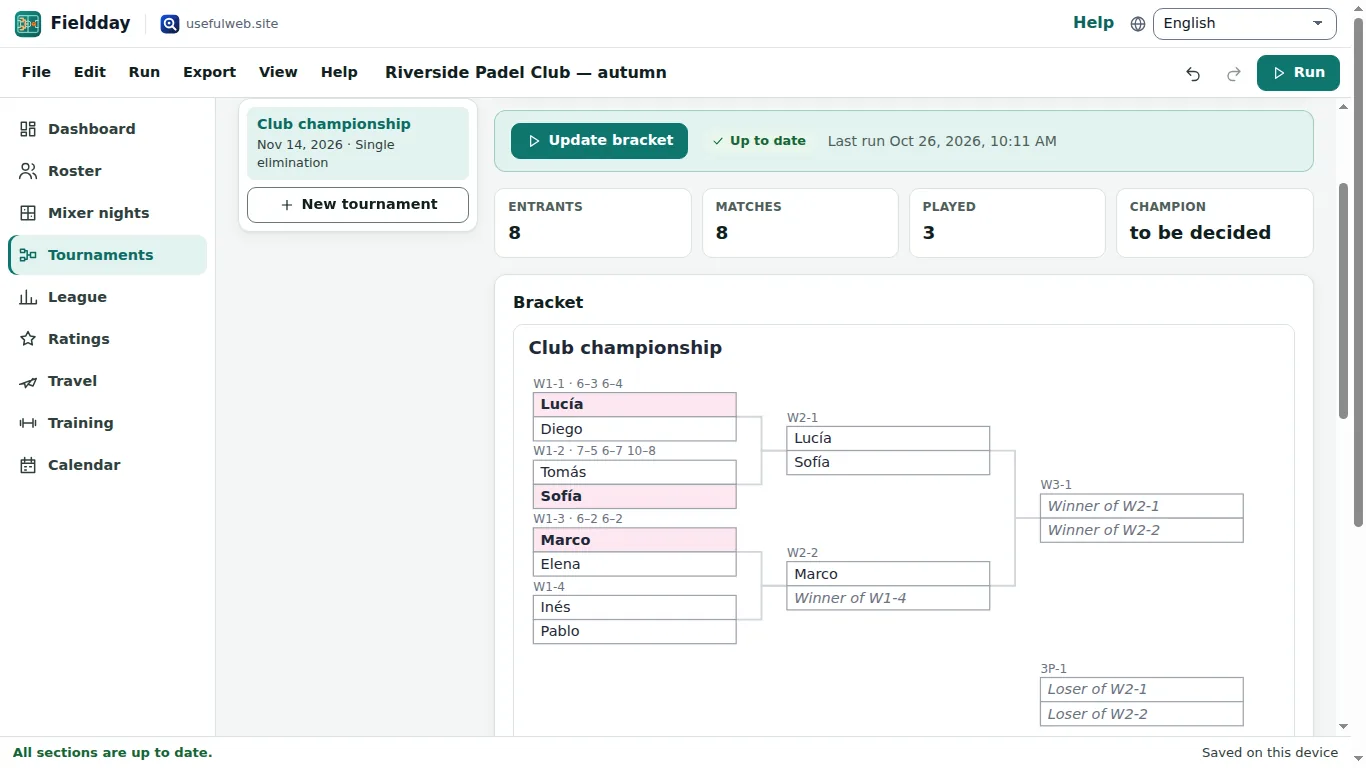 Bracket with one-click results
 League table, title odds and scenarios
 Ratings fed by every match
 Away-trip fatigue and jet-lag plan
 Training plans for runners and lifters
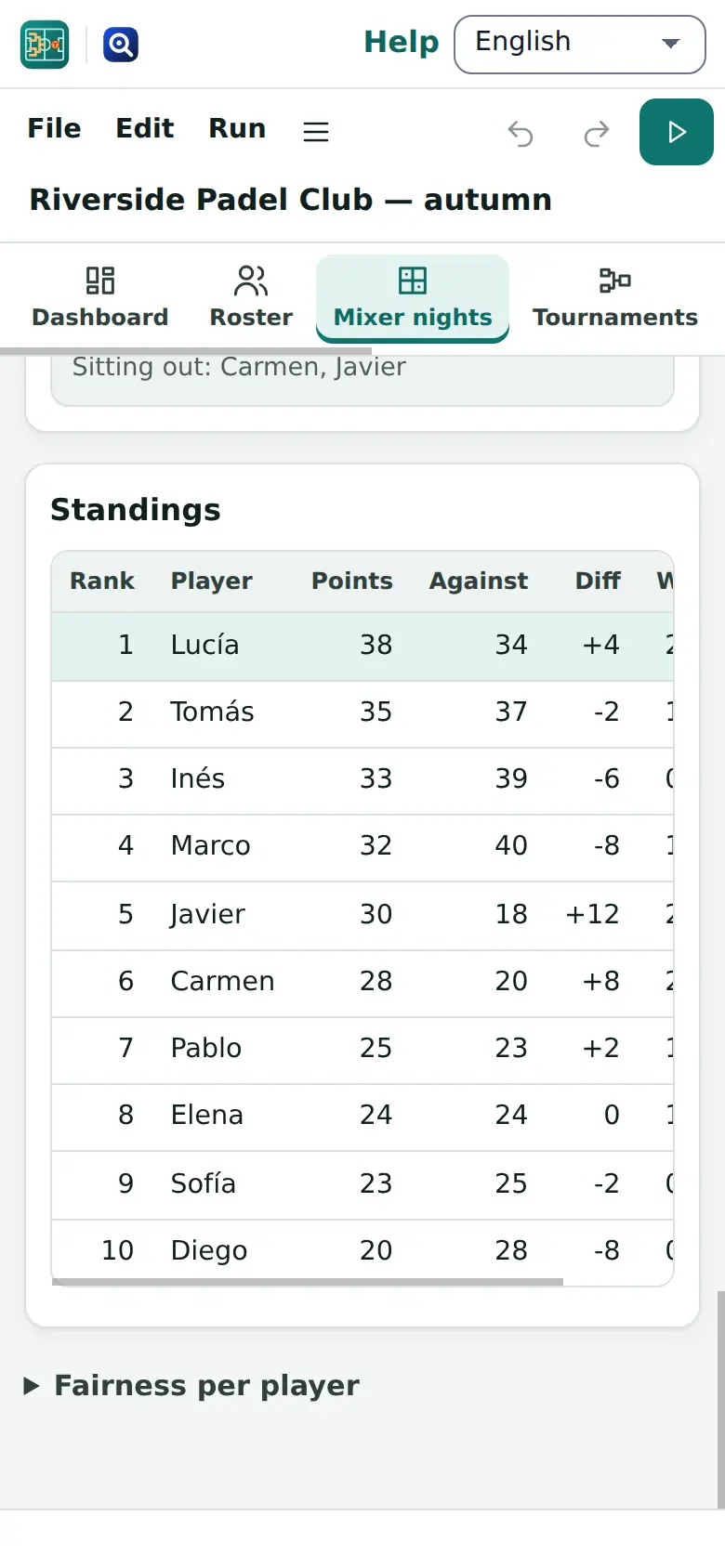 Works on phones too
Features
One roster for everything
Players with skill, starting rating, group and status feed every workflow. Paste a list, import a CSV or receive a player table from another app — always with a review step.
Americano & Mexicano nights
Fair doubles rounds with balanced sit-outs from the roster, scores typed straight into the court table, live standings and the next Mexicano round as soon as the scores are in.
Brackets with one-click results
Single or double elimination or round robin, seeded as listed, by roster rating or by a reproducible draw. Pick winners in the match list and the bracket advances; export it as SVG or PNG.
League table & what-if scenarios
Teams, fixtures and results in one table, a generated double round robin, title and relegation odds from a seeded simulation, and scenarios A/B/C compared side by side on the same random numbers.
Ratings fed by every match
Scored mixer matches, bracket results and logged games become one Elo / Glicko-2 rating log, grouped by event, week or month, with win probabilities for any pairing.
Rating snapshots over time
Save the ladder after every club night and compare: biggest movers, newcomers and a rating chart across snapshots.
Balanced teams in seconds
Split the active players (or one group) into 2–8 teams balanced by skill with a seeded draw that anyone can reproduce.
Away-trip fatigue
Travel distance, time-zone jumps, rest days and back-to-backs for every game of a road trip as a transparent 0–100 score, with the hardest game highlighted.
Jet-lag plans for long trips
For trips across time zones: a day-by-day sleep, light and caffeine plan for the squad, suggested from the trip and downloadable as a calendar file.
Running training table
Time trials per runner give race predictions, the goal-race time with even or negative splits and a progress line over the season — run for the whole group in one batch.
Strength block with plate loading
Estimated one-rep maxes from test sets, progress since the first test and a percentage block whose weekly loads come with the plates to put on each side.
Club calendar & reminders
Training slots repeated weekly, mixer nights, tournaments, fixtures and trip games in one agenda, exported as an .ics calendar with reminders.
Dashboard & club report
Key numbers, plain-language findings, upcoming events and leaders on one page, plus a printable report (PDF via print) of every section.
Run everything in one go
One click runs every section in dependency order — events first, then ratings — with progress, retry and clear messages when a tool rejects an input.
Local-first projects
Autosave in this browser, recent projects, undo and redo, project files, share links, Google Drive (when connected) and hand-over of tables and brackets to other premium apps.
Same tools for scripts and AI agents
Every calculation is a usefulweb tool with a JSON API and MCP; the documented project format lets an agent build a club file and open it in Fieldday.


Templates
Start from a ready-made project and change it to fit.
Padel club: Americano night and championship
Twelve members with skills and ratings, a scored Americano, a Mexicano to draw, a rating-seeded championship and the weekly drills calendar.
Chess club: ladder ratings and round robin
Sixteen ladder games over two months for Elo/Glicko-2 ratings, a rapid round robin with results and a double-elimination knockout seeded by rating.
Youth football: league table and what-ifs
Six teams, a double round robin with six match days played, title odds and two what-if scenarios, plus a squad to split into balanced training teams.
Running club: marathon training block
Five runners with time trials, goal races and split strategies: race predictions, goal splits and progress over the autumn, with the session calendar.
Strength block: 1RM tests and loading plan
Test sets for squat, bench, deadlift and clean: estimated one-rep maxes, progress since September and a five-week percentage block with plate loading.
Basketball team: road trip fatigue and jet lag
A seven-game western road trip with travel distance, time-zone shifts and back-to-backs, and a pre-season tour to Japan with a jet-lag plan.
Open in app: Basketball team: road trip fatigue and jet lag →
Built-in tools
Fieldday uses these tools. Each one also has its own page and works on its own, in the browser, through the JSON API and through MCP.
- Padel & Pickleball SchedulerFair Americano or Mexicano doubles rounds with balanced sit-outs, scores and standings.
- Tournament Bracket MakerSingle or double elimination or round robin: seeded brackets, byes, results and downloads.
- Elo/Glicko Rating LabRate players from game results with Elo, Glicko-1 and Glicko-2; history chart and win odds.
- Sports What-If SimulatorSimulate a match or a small league with a Poisson goal model — and replay “what if”.
- Sports Travel-Fatigue EstimatorTravel distance, time-zone jumps, rest and back-to-backs per game as a fatigue score.
- Running Pace & SplitsPace, time or distance in km or miles, splits, race predictions, treadmill speed, laps.
- One-Rep-Max & Plate Loader1RM from any set (7 formulas + average), % and RPE tables, and which plates to load.
- Random GeneratorRandom numbers, dice, coins, list picks, shuffles, fair teams, dates, strings and UUIDs.
- Jet Lag PlannerA day-by-day sleep, light and caffeine plan to beat jet lag, with calendar export.
For AI agents
Fieldday runs on a deterministic engine. The same functions are available as tools with a JSON API and MCP, so scripts and AI agents get exactly the results the app shows.
- Padel & Pickleball Scheduler – Fair Americano or Mexicano doubles rounds with balanced sit-outs, scores and standings.
Tool page ·POST https://fieldday.usefulweb.app/api/v1/tools/padel-pickleball-scheduler/calculate· MCPpadel_pickleball_scheduler - Tournament Bracket Maker – Single or double elimination or round robin: seeded brackets, byes, results and downloads.
Tool page ·POST https://fieldday.usefulweb.app/api/v1/tools/tournament-bracket-maker/calculate· MCPtournament_bracket_maker - Elo/Glicko Rating Lab – Rate players from game results with Elo, Glicko-1 and Glicko-2; history chart and win odds.
Tool page ·POST https://fieldday.usefulweb.app/api/v1/tools/elo-glicko-rating-lab/calculate· MCPelo_glicko_rating_lab - Sports What-If Simulator – Simulate a match or a small league with a Poisson goal model — and replay “what if”.
Tool page ·POST https://fieldday.usefulweb.app/api/v1/tools/sports-what-if-simulator/calculate· MCPsports_what_if_simulator - Sports Travel-Fatigue Estimator – Travel distance, time-zone jumps, rest and back-to-backs per game as a fatigue score.
Tool page ·POST https://fieldday.usefulweb.app/api/v1/tools/sports-travel-fatigue-estimator/calculate· MCPsports_travel_fatigue_estimator - Running Pace & Splits – Pace, time or distance in km or miles, splits, race predictions, treadmill speed, laps.
Tool page ·POST https://fieldday.usefulweb.app/api/v1/tools/running-pace-calculator/calculate· MCPrunning_pace_calculator - One-Rep-Max & Plate Loader – 1RM from any set (7 formulas + average), % and RPE tables, and which plates to load.
Tool page ·POST https://fieldday.usefulweb.app/api/v1/tools/one-rep-max-calculator/calculate· MCPone_rep_max_calculator - Random Generator – Random numbers, dice, coins, list picks, shuffles, fair teams, dates, strings and UUIDs.
Tool page ·POST https://fieldday.usefulweb.app/api/v1/tools/random-generator/calculate· MCPrandom_generator - Jet Lag Planner – A day-by-day sleep, light and caffeine plan to beat jet lag, with calendar export.
Tool page ·POST https://fieldday.usefulweb.app/api/v1/tools/jet-lag-planner/calculate· MCPjet_lag_planner
- MCP endpoint (Streamable HTTP):
https://fieldday.usefulweb.app/mcp - Project file format (JSON Schema): https://fieldday.usefulweb.app/project.schema.json
- OpenAPI description: /openapi.json · llms.txt · API & MCP
Build a project through the API, then open it in the app with a link to https://fieldday.usefulweb.app/app#project=<base64url JSON>.
Import & export
Import
- Fieldday project (.fieldday.json)
- Player list (CSV/TSV or one name per line)
- Player table from another premium app (App Bridge)
- Project link (#project=…)
Export
- Fieldday project (.fieldday.json)
- CSV: roster, schedules, standings, fixtures, ratings, training tables
- Bracket as SVG and PNG
- iCalendar (.ics) with reminders
- Jet-lag plan (.ics)
- Printable club report (PDF via print)
- Share link
Keyboard shortcuts
| Keys | Action |
|---|---|
| Ctrl + Enter | Run the tools of the current section |
| Ctrl + Shift + Enter | Run every section |
| Ctrl + S | Save project file |
| Ctrl + O | Open project file |
| Ctrl + Z / Ctrl + Y | Undo / redo |
| Ctrl + P | Print the club report |
| 1 … 9 | Go to a section (dashboard … calendar) |
| N | Add an item to the current section |
| ? | Keyboard shortcuts |
Frequently asked questions
Is Fieldday free? Do I need an account?
Yes, it is free and needs no account. Projects are saved in your browser (IndexedDB) and as files you download; with Google Drive connected you can also save them there.
Where are the calculations done?
The nine built-in tools run on usefulweb’s server through the same JSON API that scripts use; Fieldday sends only the inputs of the section you run (names, scores, dates, times) and keeps the results in your project. Editing works offline; running a tool needs a connection.
How do mixer matches count in the ratings?
A scored doubles match counts as one game between each player and each player on the other side of the net (four games per match): a win for both winners against both losers, a draw for equal points. You can switch this off per session or tournament.
Why are rating periods important?
Glicko rates all games of a period together. Fieldday groups the log by event (each club night or tournament), ISO week or month; Elo is updated game by game either way. One run rates the latest 200 games.
How reliable are the league odds?
They come from a Poisson goal model (from goal averages or Elo ratings) simulated thousands of times with a fixed seed. It ignores injuries, form and motivation, so treat it as an informed what-if, not a forecast for betting.
Is the fatigue score a medical measurement?
No. It is a transparent heuristic with documented weights for distance, time-zone shift, rest and schedule density, useful to compare trips. The jet-lag plan follows CDC rules of thumb and is not individual medical advice.
Can I share a tournament with players?
Copy a share link (it contains the whole project in the link, nothing is stored on a server), print the report, export the bracket as SVG or PNG, or export the calendar as .ics.
Can an AI agent create a Fieldday project?
Yes. The project format is the JSON Schema at /static/apps/fieldday/fieldday.schema.json (also served at /project.schema.json), and every tool is available over the JSON API and MCP on fieldday.usefulweb.site. An agent can build a project and open it with /app#project=<base64url JSON>.
Limitations
What Fieldday does not do (yet):
- Fieldday is an organiser, not a booking system: no online sign-ups, payments, messaging or member logins.
- Tools run on the usefulweb server: without a connection you can edit and view saved results but not run new calculations.
- Mixer nights are doubles only (4 players per court); singles ladders go through tournaments and the game log.
- One rating run uses the latest 200 games and at most 100 starting ratings; older games stay in the log.
- The league simulator handles up to 16 teams and 240 fixtures with a Poisson goal model (football-style scores).
- Travel fatigue knows 118 major sports cities; other venues need latitude,longitude and a time zone.
- Training plans cover running paces and barbell percentages; there is no heart-rate, GPS or wearable import.
- Calendar files are exported, not synced: re-export after changes.
Tutorials
Learn Fieldday step by step.
- Your first club night in 5 minutesAdd your players, draw a padel or pickleball Americano, enter the scores court by court and read the live standings. Nothing to install.Beginner 5 min
- Mexicano rounds and tournament bracketsRun a Mexicano round by round, then seed a single- or double-elimination bracket from your ratings, click winners and export the bracket as SVG or PNG.Beginner 8 min
- League table, title odds and what-if scenariosGenerate a round robin, enter the results so far, simulate the rest of the season and compare scenarios such as “we win the derby” side by side.Intermediate 10 min
- Ratings from every matchTurn mixer scores, bracket results and logged games into Elo and Glicko-2 ratings, save snapshots and see who moved since last month.Intermediate 8 min
- Away trips, fatigue and jet lagPlan a road trip game by game, see distance, time-zone shifts, back-to-backs and a fatigue score per game, and add a jet-lag plan with a calendar file.Intermediate 7 min
- Training plans for runners and liftersTrack time trials and test sets, get race predictions, goal paces and splits, estimated one-rep maxes and a loaded percentage block with plates per side.Intermediate 10 min
- Calendar, club report and sharingBuild a weekly training schedule, export everything to your calendar with reminders, print a club report, share a project by link or send tables to other apps.Beginner 6 min
Ready to try it?
Other premium apps
-

Kerfwise
Cabinet & furniture CAD
Design cabinets and furniture, get cut lists, optimised sheet layouts, costs and drawings.
-

Kinetica
Robot motion studio
Simulate robot arms in your browser: kinematics, trajectories, collisions, program export.
-

Threadsmith
Embroidery digitizing studio
Draw or import artwork, turn it into stitches, export DST, PES, JEF or EXP files.
-

Ohmforge
Virtual electronics workbench
Draw a circuit, switch it on, and measure it with real-feeling bench instruments.
-

Twinworks
Factory digital twin & production simulation
Model a production line, simulate it and find the bottleneck — free, in your browser.
-

Agentlab
AI-agent & LLM workbench
Test an AI agent before release: permissions, traces, costs, citations and output checks.
-

Bundlekeep
Local project backup
Back up projects from every usefulweb app into one file, check it and restore any part.
-

Chainscope
Web3 investigation desk
Investigate transactions, bridges, contracts, DAOs and wallets in one case file.
-

Chartroom
Data & charts studio
Import data, chart it, run analyses and publish a report — one workspace, free.
-

Flipline
Drawing, storyboards & animation
A few drawings. A little life. Make a flipbook in your browser.
-

Hearth
Home & travel planner
Plan meals, chores, home care, a move and trips for your whole household in one place.
-

Keysmith
Crypto & secrets lab
Audit certificates, keys, TLS and passwords in one lab; secrets stay on your device.
-

Ledgerly
Household finance & life-admin desk
Budgets, bills, subscriptions, loans, contracts and deadlines on one private desk.
-

Lumina
Photo editor & image toolkit
Bring out what you saw. A free photo studio, right in your browser.
-

OBSCURIQ
OSINT case desk
Organize public-source research: cases, a research log, pivots and indicators.
-

Opsdeck
Developer & ops workbench
One deck for CI failures, cron, traces, k8s events, API diffs, query plans and Terraform.
-

Pageboard
Website inspiration boards
Collect website references, sort them with tags and arrange them on a moodboard.
-

Panelcraft
Comic books & figure references
Shape a page. Arrange a book. Give your story a voice.
-

Paperwell
Document studio: PDFs, OCR, redaction, forms & contract reading
Your paperwork in one dossier: PDF tools, OCR, redaction, forms and contract reading.
-

Proofline
Math notebook
Solve, graph, test and visualise in one notebook — with data, findings and a report.
-

Provenance
Software supply-chain security desk
SBOMs, CVEs, containers and licences in one risk register — free, in your browser.
-

RavingDesk
Paper trading workspace
Practise trading on paper: orders, ledger, risk, exposure and journal. No real money.
-

Reelcraft
Audio, video & image batch studio
Audio, video & image batch studio: cut, convert, compress, subtitle, reframe
-

Renderloom
3D scene & material studio
Shape a scene. Find its light. Keep every idea editable.
-

Signalhouse
Website & internet infrastructure inspector
Inspect DNS, TLS, mail, CDN and routing of all your domains — and see what changed.
-

Tonegrid
Tone matrix & beat sequencer
Light up squares to build looping melodies and beats, then arrange them into songs.