Tutorial 5 of 7
Away trips, fatigue and jet lag
Intermediate 7 min
Plan a road trip game by game, see distance, time-zone shifts, back-to-backs and a fatigue score per game, and add a jet-lag plan with a calendar file.
Load Basketball team: road trip fatigue and jet lag from File → Templates… and open Travel.
1. A trip
Click New trip and fill in the Trip card:
- Title and Starting city (home).
- Games in date order — Add game for each game with Date, Start (local), City or lat,lon and an Opponent / note.
City names come from the 118 cities bundled with the Sports Travel-Fatigue Estimator; start typing to see suggestions. For any other place enter coordinates such as 48.14,11.58.
2. Estimate fatigue
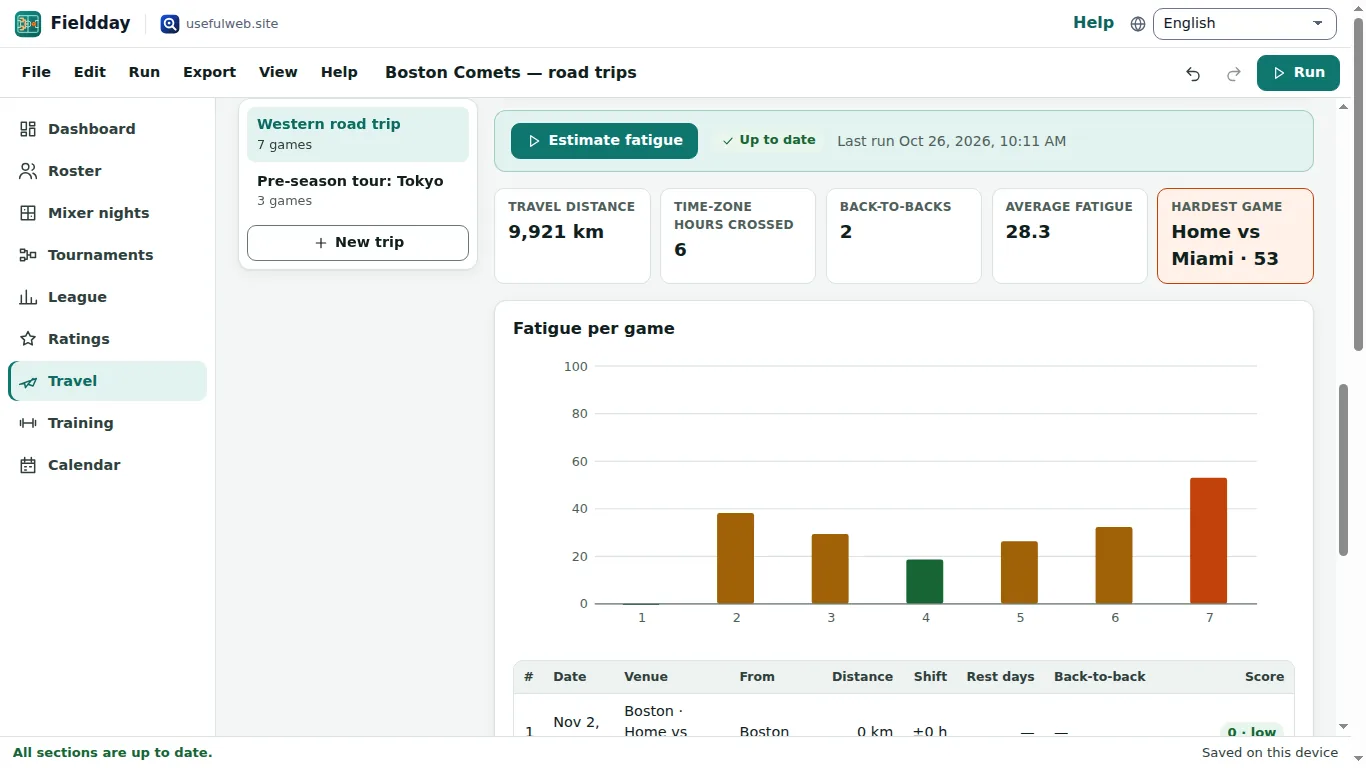
Click Estimate fatigue. The key numbers show Travel distance, Time-zone hours crossed, Back-to-backs, Average fatigue and the Hardest game. Fatigue per game charts the 0–100 score of each game, and the table below explains it: distance, zone shift, rest days and whether it is a back-to-back.
If a city is not recognised, the run stops with a sentence that names it — fix the city and press Try again.
3. Jet-lag plan
For long-haul trips tick Make a jet-lag plan for this trip. Suggest from trip fills in the home and destination time zones and the travel dates from your games; adjust Usual bedtime, wake time, Days to pre-adjust and Chronotype if needed. The next run adds a day-by-day schedule from the Jet Lag Planner: bed and wake times, when to seek and avoid light, and when to stop caffeine.
4. Take it with you
The trip games appear in the Calendar. Export → Calendar (.ics)… puts the games (and, if you like, trainings and fixtures) into any calendar app with reminders.
Ready to try it?