Tutorial 3 of 7
League table, title odds and what-if scenarios
Intermediate 10 min
Generate a round robin, enter the results so far, simulate the rest of the season and compare scenarios such as “we win the derby” side by side.
Open File → Templates… and pick Youth football: league table and what-ifs. It has six teams, a double round robin and six match days played.
1. Teams and strength
Open League. In League settings choose how Team strength from is calculated:
- Goals scored / conceded per game — each team gets two rates in the Teams table; the simulator draws scores from them.
- Elo ratings — each team gets an Elo value, plus an Average goals per match for the league.
Home advantage (% more expected goals), Simulations (100 to 50,000) and an optional Seed complete the setup. With a seed the same inputs always give the same odds.
2. Fixtures and results
Generate round robin… creates every pairing with the circle method: choose the First round date, Days between rounds, the Kick-off time and one or two Legs. Existing fixtures are replaced, so do this before you enter results.
In Fixtures & results type the goals of the games that have been played. Leave both fields empty for games still to come. A half-entered result is kept, but counts as not played.
3. Simulate
Click Simulate season. Fieldday sends the table, the remaining fixtures and your settings to the Sports What-If Simulator and shows:
- Table — the standings from the results you entered.
- Season odds — title, top-2 and bottom chances, expected points and average position for every team.
4. What-if scenarios
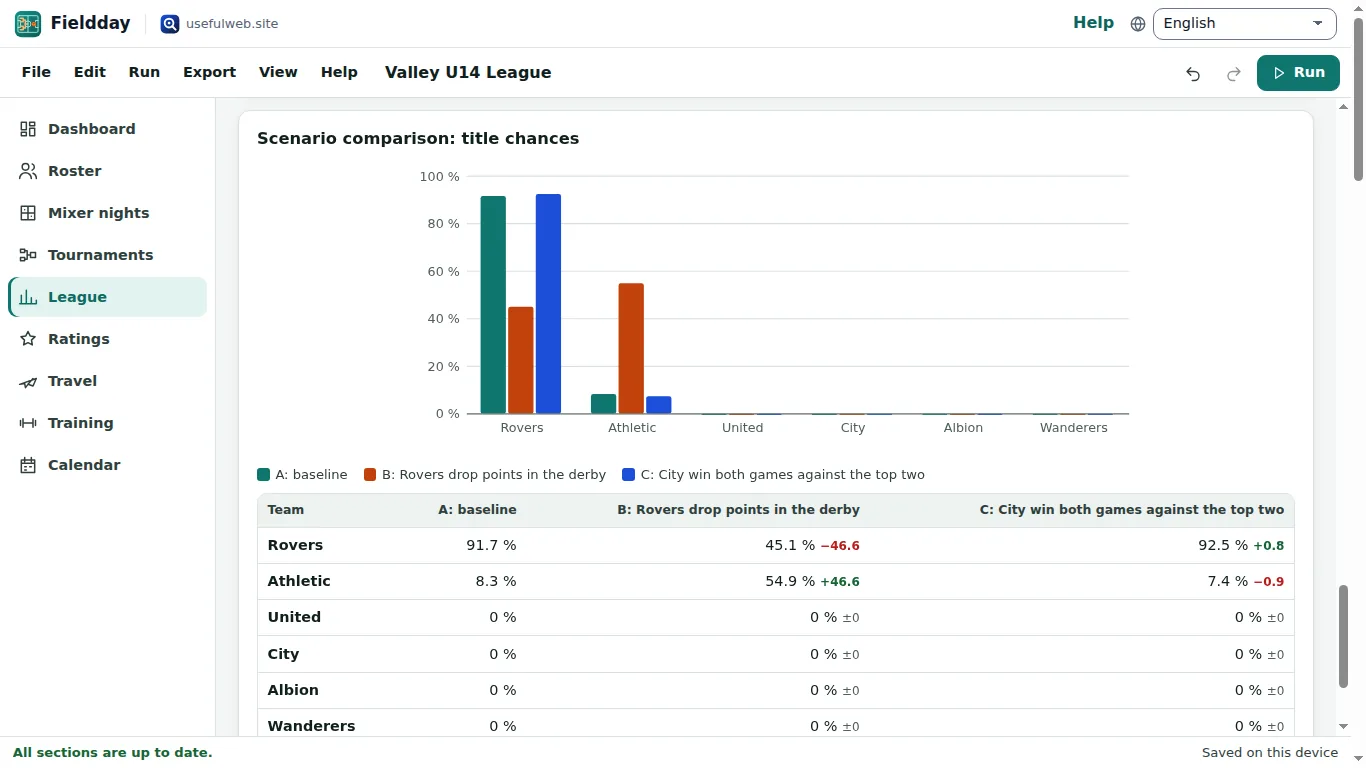
Under What-if scenarios click Add scenario, give it a Scenario name and use Add changed result to fix the score of one or more future (or past) games. The template has two: Rovers drop points in the derby and City win both games against the top two.
Simulate season runs the baseline and every scenario on the same random numbers, so differences come from your changes, not from noise. Scenario comparison: title chances shows a grouped bar chart and a table with the change against the baseline for every team.
5. Use the fixtures elsewhere
Every fixture appears in the Calendar and in the .ics export. Export offers the fixtures and the league table as CSV, and Send … to another app… passes them as a table to apps such as Chartroom.
Ready to try it?